Prayer tracking
How to use a prayer tracker without losing sight of your day
A prayer tracker records what you choose to save. Learn how to check prayer times, record a prayer later and understand your history in MishMish.
Give the record a clear purpose
A prayer tracker can help you remember which prayers you recorded and look back over your own days. It records your entries; it cannot know everything about your circumstances or measure the value of worship. Start with the question you actually want the record to answer, such as “Which prayers have I already marked today?”
MishMish brings the five daily prayers together on Today. Prayer times tell you when the app calculates each window. A saved mark tells you that you chose to record a prayer. Those are different pieces of information.
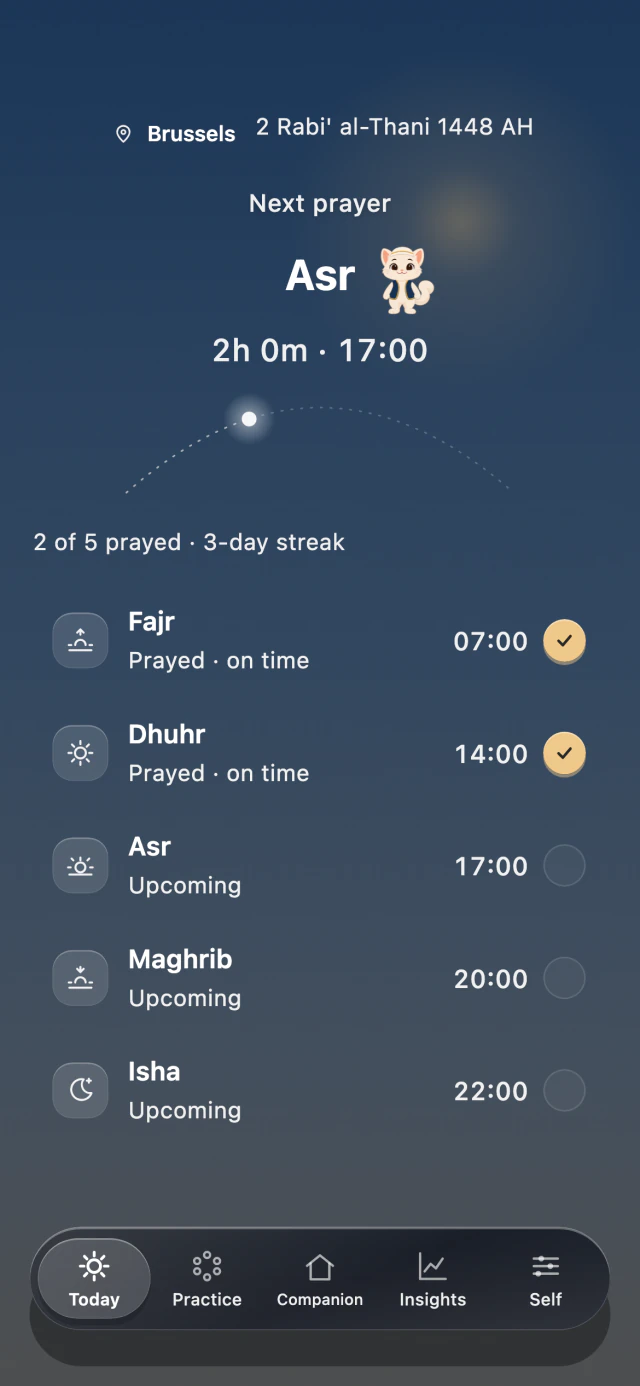
Your prayer timetable and personal record appear together. The times and records shown here are examples.
App previews · example times and records · 7 October 2026
Check the timetable before you rely on it
Set the location you want the app to use and review its calculation preferences. Compare the times with a local timetable you trust. If the two differ, check the settings and ask your local mosque which timetable to follow.
Review the location again when you travel. A reminder or a tracker entry should refer to the day and place you intend, rather than a setting you forgot to update.
Record what happened, even if you log it later
During an open prayer window, you can mark the prayer directly after performing it. When you record a prayer after its window has ended, MishMish asks whether you prayed Within prayer time or After prayer time. Choose the answer that describes what happened.
For example, if you prayed within the window but opened the app later, choose Within prayer time. The time you tap the button and the time you prayed are not the same thing. This timing choice does not ask you to invent an exact performance time.
Keep Focus and recording separate
Begin Focus opens a quiet in-app prayer screen. After praying, I have prayed records the prayer. Hold to leave lets you leave without recording. Opening Focus, dismissing a notification or waiting for a timer to end does not automatically mark a prayer.
Optional app blocking is another separate setting. Its role is to limit access to selected apps during a session; it is not evidence that a prayer took place. You remain the person who chooses what to record.
Read your history as a personal record
Use the calendar and summaries to review saved entries. If the app shows an empty space, that means there is no saved entry there; it is not a complete description of your day. A streak is a fact about the app’s records, not a measure of faith.
You can begin with prayer times and tracking for free in MishMish. If you prefer a paper record, the same distinction helps: note which prayer you mean and what you actually did, without asking a calendar to tell your whole story.